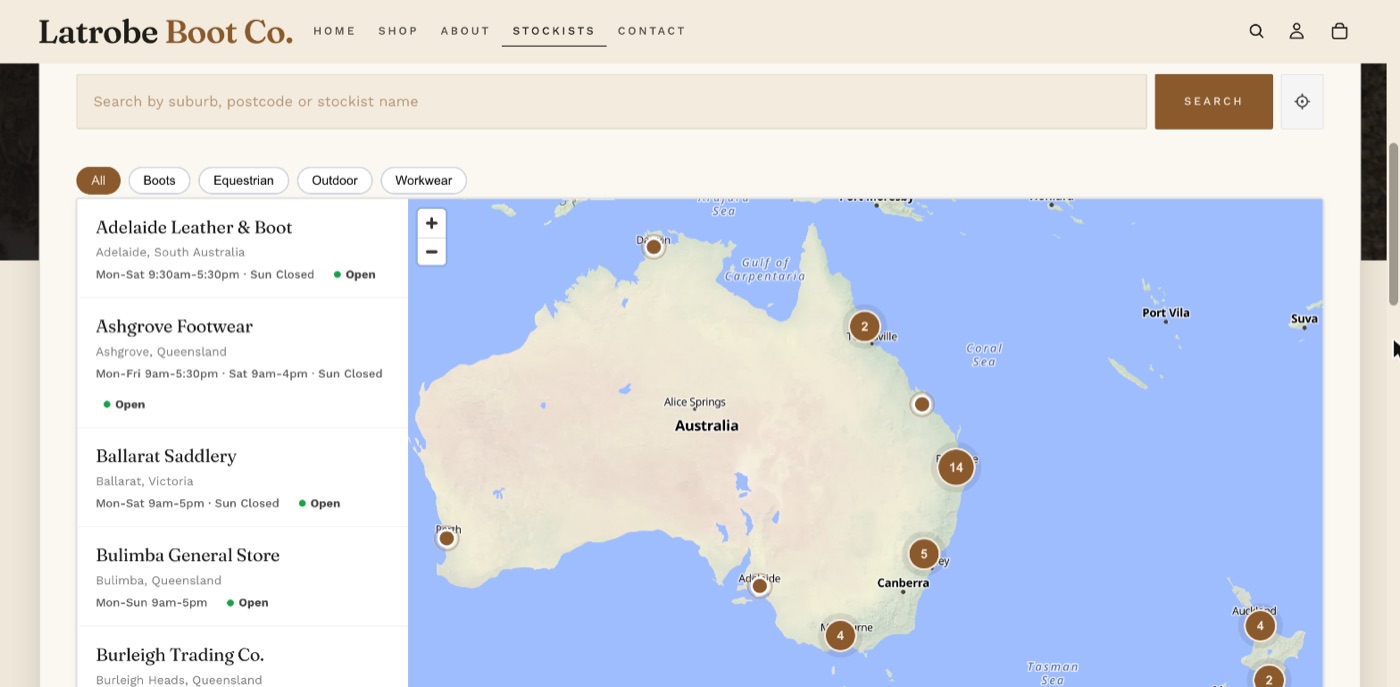
Stockist Map Sync puts an interactive stockist map, also called a store locator or where-to-buy map, on your Shopify online store. Its App Store name is Saol - Stockist Map Sync.
The idea
Your stockists are usually already wholesale customers in Shopify. Tag a customer and they appear on the map. Change their address or remove the tag and the map follows.
If your stockists are not Shopify customers, you can import them from a spreadsheet or add them by hand. The three ways can be mixed.
What you need
- A Shopify store with the Online Store sales channel.
- A theme that supports app blocks (an Online Store 2.0 theme). All of Shopify's current free themes and most paid themes from the last few years do.
- Permission to install apps on the store.
You do not need a Google Maps API key, any other key, an outside account or a developer.
On an older "vintage" theme the map block cannot be added through the theme editor. Email [email protected] with the theme's name and I will check.
Who it suits
- Brands that sell through retailers, stockists, dealers or distributors and want a "find a stockist" page.
- Stores with their own shops or showrooms that want a store locator.
It suits a few locations up to a few hundred. If you have thousands, email support first.
Where to go next
Still stuck? Email [email protected] or ask the assistant in the corner of this page. I answer within one business day, Brisbane time.