What is synced
Only customers carrying one of the tags in the app's Settings are synced. Other customers are never read into the app.
When the map updates
- After the first sync, by itself. When a tagged customer is created, edited or deleted in Shopify, the map updates within moments.
- Every night. A full check runs to catch anything that was missed.
- Whenever you ask. Sync Now on the Dashboard runs a full sync. It is safe to press any time.
The storefront keeps map data for up to five minutes, so allow a few minutes before a change shows to shoppers.
What a sync does
- A newly tagged customer is added.
- If a customer's address changes in Shopify, the pin moves.
- Removing the tag from a customer, or deleting the customer, removes their stockist from the map.
Safeguards
- If a sync finds no customers with the tag, nothing is deleted. This protects against a mistyped tag wiping the map.
- If an address cannot be found, a new stockist is not added and the sync result names it. For a stockist already on the map, the new address is saved and the old pin is kept until the address can be found.
- When the plan's location limit is reached, further tagged customers are not added until there is room. The result names the customers left off.
The Dashboard
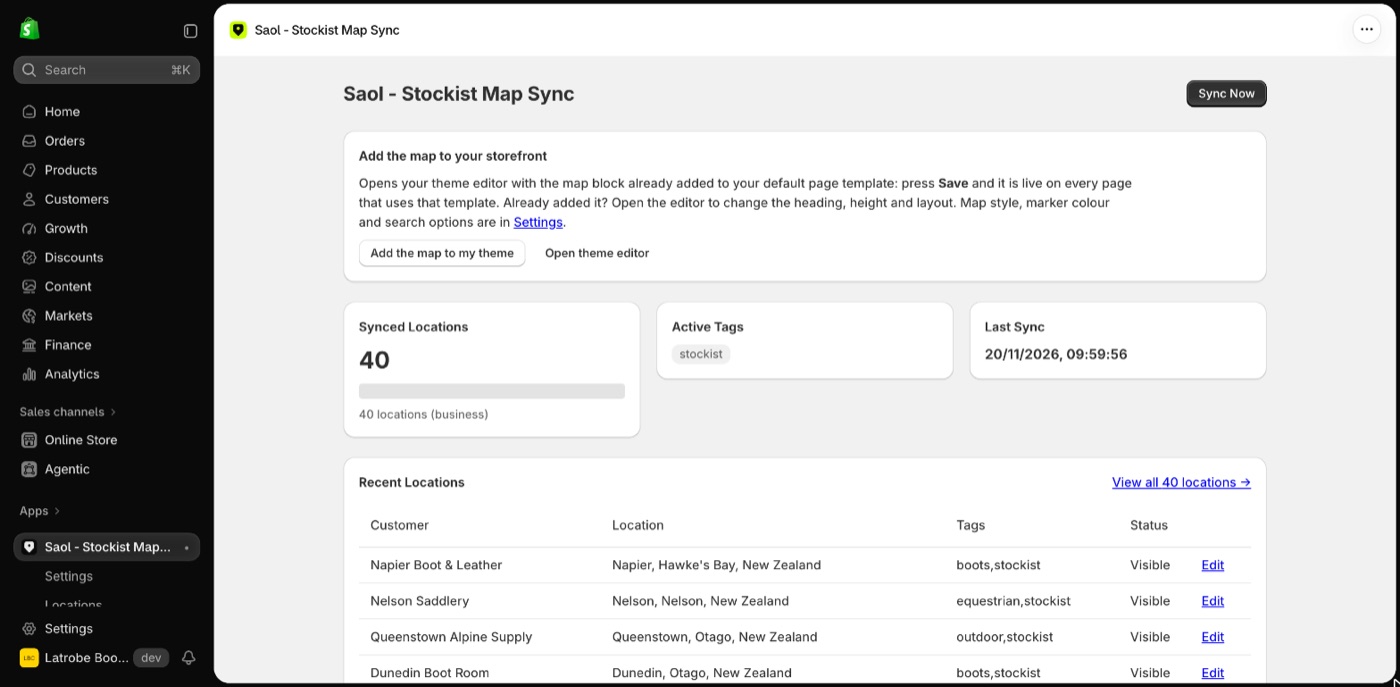
The Dashboard shows Synced Locations (the count against your plan's limit), Active Tags, Last Sync and Recent Locations.
Related: Sync stockists from customer tags and Troubleshooting.
Still stuck? Email [email protected] or ask the assistant in the corner of this page. I answer within one business day, Brisbane time.